Search for the best learning apps for adults and a lot of what comes back is language apps. That's fine if you want Spanish. This list is for everyone else: adults who want to finally understand statistics, read more, pick up a creative skill or get the big ideas from books they never got around to.
We sorted ten apps by what they teach and wrote down each one's October 2026 price, its free option and its catch. Inkly is our app, so weigh our take accordingly. Everything below comes from each app's App Store and Google Play listing, pricing page and help center; we didn't hands-on test all ten.
What are the best learning apps for adults in 2026?
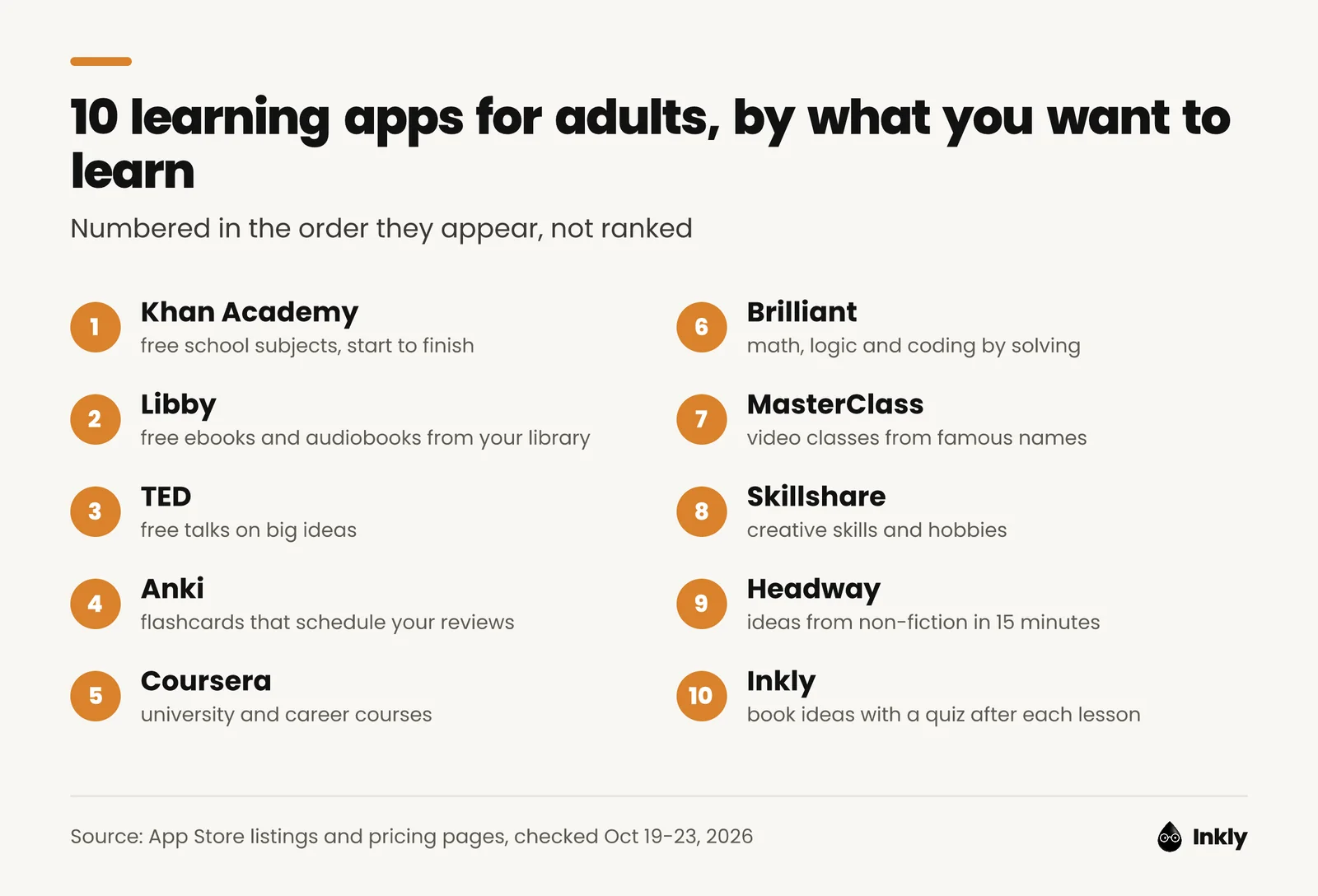
The best learning apps for adults in 2026 are Khan Academy, Libby, TED, Anki, Coursera, Brilliant, MasterClass, Skillshare, Headway and Inkly. Four are free or close to it, two teach structured courses, two teach creative skills and two turn non-fiction books into short lessons.
| App | Best for | Free option | Price from (US) | Platforms | App Store rating |
|---|---|---|---|---|---|
| Khan Academy | School subjects | Everything | Free | iOS, Android, web | 4.6 (112,547) |
| Libby | Reading and audiobooks | Everything, with a library card | Free | iOS, Android, web | 4.9 (4.6 million) |
| TED | Big ideas, short talks | All talks | Free | iOS, Android, web, Apple TV | 4.6 (10,319) |
| Anki | Remembering anything | Desktop, web and Android | $24.99 once on iPhone | All | 4.0 (2,367) |
| Coursera | University and career courses | First module of most courses | $59/month or $399/year | iOS, Android, web | 4.8 (177,390) |
| Brilliant | Math, logic, coding | Daily lesson | $20/month, billed yearly | iOS, Android, web | 4.7 (33,112) |
| MasterClass | Classes from famous experts | None | $10/month, billed yearly | iOS, Android, web, TV | 4.9 (122,875) |
| Skillshare | Creative skills | Free trial only | $167.88/year | iOS, Android, web | 4.8 (25,454) |
| Headway | Ideas from books | 1 summary a day | $12.99/month or $89.99/year | iOS, Android | 4.6 (117,226) |
| Inkly | Book ideas + quizzes | Plan preview | $9.99/month or $19.99/year | iPhone only | 4.6 (17) |
Prices are in US dollars, checked between October 19 and 23, 2026, on each company's pricing page or, where it publishes none, the US App Store. Ratings are US App Store averages with the number of ratings on October 23. Anki's rating is for AnkiMobile, its iPhone app.
How we picked: we started from what adults actually want to learn (school subjects they missed, career skills, math, creative hobbies, reading, big ideas) and chose the best-known app for each that publishes its prices or is free. We left out language apps on purpose. If that's what you want, Duolingo is in our list of the best microlearning apps. Number 1 isn't better than number 10.
What are the best free learning apps for adults?
The best free learning apps for adults are Khan Academy, Libby and TED, which are free in full, and Anki, which is free everywhere except the iPhone. None of the four asks for a credit card.
1. Khan Academy: best free app for school subjects
Khan Academy is a nonprofit learning app with free videos, exercises and articles in math, science, economics and the humanities.
- Best for: the algebra, chemistry or economics you skipped the first time, or want to relearn before helping a kid with homework.
- What you get: 840+ free courses from K-12 to early college, according to Khan Academy's About page, with videos you can download for offline viewing.
- Price: free, with no in-app purchases. Khan Academy is a 501(c)(3) nonprofit. Its AI tutor, Khanmigo, is a separate paid product.
- Platforms: iOS, Android and web. 4.6 stars from 112,547 US App Store ratings.
- Catch: it feels like school, because it is school. Test prep and programming only work on the website.
2. Libby: best for reading more without paying for books
Libby is a free app from OverDrive that lends you ebooks, audiobooks and magazines from your public library, using your library card.
- Best for: adults whose learning plan is "read more books" and whose budget isn't.
- What you get: borrowing, holds, offline downloads, audiobook speed controls and a sleep timer. Libby's help center says there are no subscription costs, no in-app purchases and no late fees. Some libraries even issue a digital card inside the app.
- Price: free with a library card.
- Platforms: iPhone, iPad, Android, Fire tablets and any browser at libbyapp.com. 4.9 stars from about 4.6 million US App Store ratings, by far the most ratings in this list.
- Catch: your library buys a set number of copies, so popular audiobooks come with a waitlist. Want to know if a book fits your month? Our reading time calculator works it out from your reading speed.
3. TED: best for big ideas in one sitting
TED is the nonprofit's official app for watching its library of thousands of talks, for free.
- Best for: an idea worth thinking about when you have one coffee's worth of time.
- What you get: talks with subtitles in over 100 languages, offline downloads and a watch-later list, per its App Store listing. The Android app adds TED's podcasts.
- Price: free. Google Play labels the app "Contains ads". TED also runs a paid membership for supporters, but publishes no price for it and doesn't say it changes the app.
- Platforms: iPhone, iPad, Apple TV, Android and ted.com. 4.6 stars from 10,319 US App Store ratings.
- Catch: watching a talk feels like learning, but there's no quiz or practice, so most of it fades. Recent App Store reviews also complain about crashes and a search that struggles to find a talk you already know.
4. Anki: best for remembering what you learn
Anki is a flashcard program that schedules each card for review just before you're likely to forget it, a method called spaced repetition.
- Best for: anything you need to recall on demand: vocabulary, medical facts, exam material, the key ideas from a book.
- What you get: free desktop apps for Windows, Mac and Linux, free sync through AnkiWeb and shared decks you can download, according to Anki's site.
- Price: free on computers, the web and Android (AnkiDroid, built by a separate volunteer team). The official iPhone app, AnkiMobile, costs $24.99 once, with no subscription; Anki says the sales fund development.
- Platforms: all of them, through four apps. AnkiMobile has 4.0 stars from 2,367 US App Store ratings, the lowest average here.
- Catch: Anki is powerful and plain-looking. AnkiMobile describes itself as a companion to the computer version, and recent reviewers say it's confusing if you start on the phone. Beware lookalike "Anki" apps with subscriptions; the real one is sold by Anki Software LLC.
Which apps teach real courses and career skills?
Coursera and Brilliant teach structured courses you work through over weeks: Coursera with university and company lectures, Brilliant with interactive problems.
5. Coursera: best for university and career courses
Coursera is a learning app with courses, certificates and degrees from universities and companies. Its App Store listing says it has more than 8,000 courses.
- Best for: adults who want a credential, a career switch or a proper university course on a subject.
- What you get: video lectures, graded assignments and certificates, with downloadable videos for offline viewing. Coursera Plus gives you unlimited access to most of the catalog and unlimited certificates.
- Price: Coursera's help center says most courses offer a free preview of the first module, without a certificate, and financial aid for people who can't pay. As of October 2026, Coursera Plus costs $59 a month with a 7-day free trial, or $399 a year with a 14-day refund window. Single courses and programs run $49 to $79 a month.
- Platforms: iOS, Android and web. 4.8 stars from 177,390 US App Store ratings.
- Catch: if you remember Coursera as free, check before you enroll. Several recent reviewers say courses they expected to audit for free now ask for payment, and the help center describes a one-module preview rather than full free access.
6. Brilliant: best for math, logic and coding
Brilliant is an interactive learning app for math, science and coding concepts, from grade 5 to college level, built around solving problems instead of watching videos.
- Best for: adults who want to think more clearly with numbers and data without going back to a textbook.
- What you get: 40+ interactive courses on Premium, in short lessons, plus an AI tutor, according to Brilliant's pricing page.
- Price: the free plan includes a daily lesson. As of October 2026, Premium costs $20 a month billed yearly (about $240) or $30 month to month on Brilliant's site. App Store prices differ, so compare before you subscribe.
- Platforms: iOS, Android and web. 4.7 stars from 33,112 US App Store ratings.
- Catch: at about $240 a year, only Coursera Plus costs more here, and recent reviewers say the free version offers too little.
Which apps teach creative skills and hobbies?
MasterClass and Skillshare teach creative and practical skills through video classes. MasterClass is about famous teachers; Skillshare is about making something.
7. MasterClass: best for learning from famous experts
MasterClass is a video-class app taught by well-known experts and cultural figures, in business, writing, cooking, music, photography and wellness.
- Best for: inspiration and how top people think about their craft.
- What you get: 200+ classes, each split into lessons that, per MasterClass's help center, average about 10 minutes. Apps for TV too, and offline downloads on the higher plans.
- Price: no free tier. As of October 2026, the plans page offers annual memberships only: Standard at $10 a month ($120 a year, one device, no downloads), Plus at $15 and Premium at $20. It has a 30-day refund guarantee, but only for first purchases made on its website.
- Platforms: iOS, Android, web, Apple TV, Fire TV, Roku and Android TV. 4.9 stars from 122,875 US App Store ratings.
- Catch: the whole year is charged up front, and you can't cancel inside the app. Most of the 100 latest App Store reviews are one-star, mainly about renewals; the overall average is far higher, so read that as a billing warning, not a verdict on the classes.
8. Skillshare: best for creative skills you can practice
Skillshare is a class app for creative skills: drawing, animation, graphic design, photography, creative writing and digital marketing.
- Best for: hobbies you learn by doing, like drawing or editing photos.
- What you get: thousands of classes from 9,000+ teachers, offline viewing, and certificates and badges, per its pricing page.
- Price: no free tier since 2021, according to Skillshare's help center. As of October 2026, the US pricing page shows $13.99 a month, paid as $167.88 for the year, after a 7-day free trial. Monthly plans exist only through the app stores.
- Platforms: iOS, Android and web. 4.8 stars from 25,454 US App Store ratings.
- Catch: the trial rolls straight into the full year, and Skillshare says it doesn't refund renewals. Its App Store text still mentions free classes and a 30-day trial, which doesn't match its own help center.
Which apps teach ideas from non-fiction books?
Headway and Inkly turn non-fiction books into lessons of 15 minutes or less. Headway gives you a whole book's argument; Inkly gives you one idea a day and quizzes you on it.
9. Headway: best for the main ideas of popular books
Headway is a book-summary app that sums up key ideas from non-fiction bestsellers in under 15 minutes, as text or audio.
- Best for: deciding whether a book deserves your next month before you commit to it.
- What you get: summaries, self-growth challenges and spaced-repetition flashcards, per its App Store listing.
- Price: the free plan gives you one summary a day. As of October 2026, Headway's features page lists $12.99 a month, $29.99 a quarter or $89.99 a year, with a 7-day free trial.
- Platforms: iPhone, iPad and Android. 4.6 stars from 117,226 US App Store ratings.
- Catch: one-star reviews cluster around surprise renewals. Our Headway app review covers the plans and how to cancel.
Blinkist, Imprint and Nibble do similar jobs with different formats (audio, illustrations, general knowledge). They're compared in our microlearning list linked above.
10. Inkly: best for book ideas with a quiz after each lesson
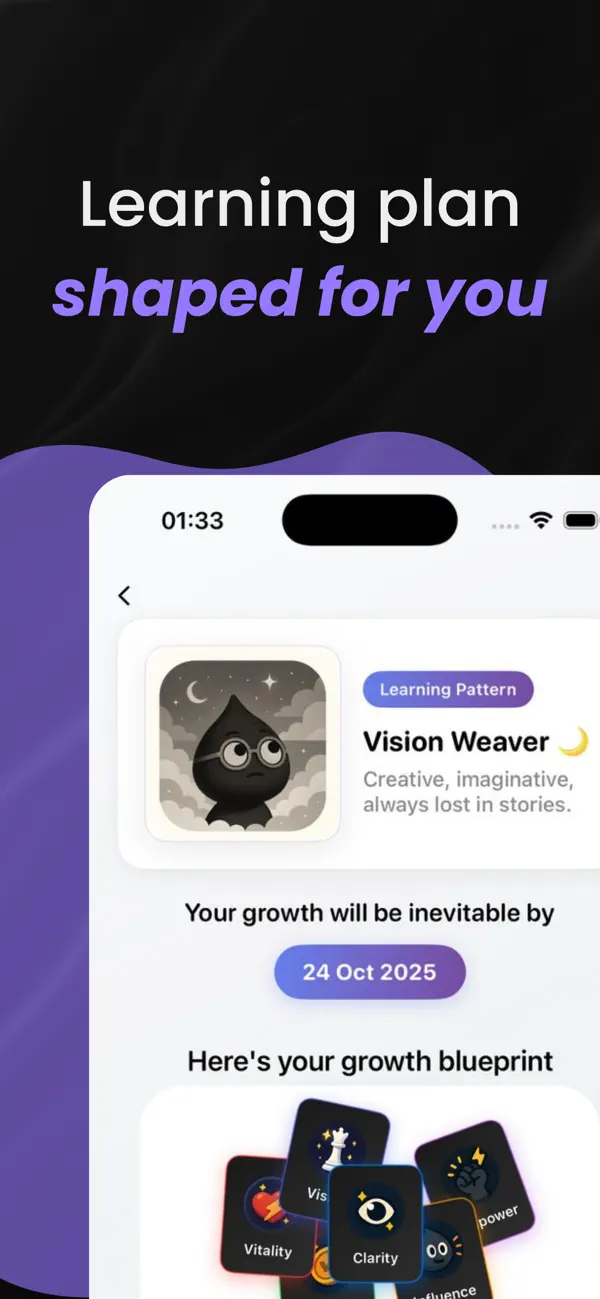
Inkly is an iPhone app that works like Duolingo for personal growth: it builds a learning plan from your goals, then turns big ideas from non-fiction books into short daily insights, each followed by a quick quiz. Inkly is our app; the facts here come from its App Store listing, same as the others.
- Best for: remembering the ideas you read about, because each lesson ends by making you recall it.
- What you get: a learning type (for example "Vision Weaver"), an adaptive plan, daily insights, quizzes, chat with Inkly to turn an idea into an action, and streaks plus a growth map across six areas.
- Price: the learning-pattern analysis and plan preview are free. Lessons, quizzes, AI reflection and progress tracking need Inkly Unlimited; as of October 2026, the App Store listing shows plans from $9.99 a month or $19.99 a year.
- Platforms: iPhone only. 4.6 stars from 17 App Store ratings.
- Catch: no Android or web app, and the free part is a preview; the lessons themselves need Unlimited.
Are there apps like Duolingo for things other than languages?
Yes. Several apps copy Duolingo's formula of short daily lessons, streaks and quizzes for other subjects. Brilliant does it for math and logic, Mimo for coding, Nibble for general knowledge and Inkly for ideas from non-fiction books. Anki keeps the "review before you forget" part and drops the cartoon owl.
The formula works because it spaces short sessions over days and makes you answer questions. An app you only watch is closer to TED than to Duolingo.
Do apps that make you smarter actually work?
Apps that teach you real material and quiz you on it make you more knowledgeable; no app has been shown to raise general intelligence. Brain-training games are the cautionary tale. In 2016, Lumosity's maker agreed to pay $2 million to settle FTC charges that it advertised benefits it couldn't back up. A 2016 review by Simons and colleagues in Psychological Science in the Public Interest found that people get better at the trained games, with little evidence it carries over to everyday thinking.
What does carry over is knowledge you can retrieve. In Roediger and Karpicke's 2006 study, 120 students who took a recall test on a passage remembered 56% of it a week later, against 42% for students who simply studied it again. So favor apps that make you answer (Khan Academy, Brilliant, Anki, Coursera's graded quizzes, Inkly) and treat TED and summaries as a starting point. Our guide on how to remember what you read shows how to add the quiz yourself when an app doesn't.
How do you choose a learning app as an adult?
Choose by the outcome you want, then try the free option for a week before paying. Step by step:
- Name the outcome. "Pass the stats module", "read 12 books this year" and "draw a decent portrait" point to three different apps. "Learn more" points to none.
- Match the format to how you learn. Video (MasterClass, Skillshare, TED), problems (Brilliant), flashcards (Anki), reading (Libby, Headway, Inkly). Our free learning style quiz shows which format you reach for first, and which study methods have real evidence behind them.
- Start free. Khan Academy, Libby, TED and desktop Anki cost nothing. Coursera, Brilliant and Headway have free previews or daily lessons.
- Read the renewal terms before the trial. MasterClass and Skillshare charge the full year up front, and neither refunds renewals. Set a reminder for the day before any trial ends.
- Give it a fixed slot. Same time, same cue: after the first coffee, on the train, before you open email. Tick it off on a printable habit tracker if streaks motivate you.
- Audit after 30 days. If you opened it on fewer than half the days, cancel and switch formats.
Want apps for habits, focus, sleep and journaling as well as learning? Our list of the best self-improvement apps covers those.
FAQ
What is the best learning app for adults?
There isn't one best learning app for adults, because they teach different things. Khan Academy is the best free choice for school subjects, Coursera for university and career courses, Brilliant for math and logic, and Skillshare for creative skills. For ideas from non-fiction books, try Headway or Inkly (our app, iPhone only).
What are the best free educational apps for adults?
Khan Academy, Libby and TED are free in full: Khan Academy is a nonprofit, Libby lends library books with your card, and TED's talks are free (the Android app shows ads). Anki is free on computers, the web and Android; only its iPhone app costs $24.99 once.
Is Coursera still free?
Coursera says most courses offer a free preview of the first module, without a certificate, and that financial aid is available for most courses. Full access and certificates need payment, either per course ($49 to $79 a month) or through Coursera Plus at $59 a month or $399 a year, as of October 2026.
Is MasterClass worth it?
MasterClass is worth it if you'll watch several classes in a year and want inspiration from famous practitioners. The cheapest plan is $120 a year, paid up front, on one device with no downloads. If you want hands-on skills with projects, Skillshare or a Coursera course teaches more of the doing.
Is there an app like Duolingo for general knowledge?
Yes. Nibble teaches general knowledge in short daily lessons with quizzes, Brilliant does the same for math and logic, and Inkly (our app) for ideas from non-fiction books. Imprint takes a similar approach with illustrated lessons.
Can adults learn effectively with apps?
Yes, if the app makes you recall what you learned and you come back over several days. Research on the testing effect (Roediger and Karpicke, 2006) shows that answering questions beats rereading for long-term memory. Apps you only watch, like TED, are better for discovering a topic than for remembering it.