Most lists crown one winner. That's backwards. A meditation app won't fix your reading habit, and a habit tracker won't teach you a single idea. So we matched one app to each goal and wrote down its October 2026 price, its free tier (if it has one) and the catch.
Pick the goal that bugs you most, read that section and skip the rest.
What are the best self improvement apps in 2026?
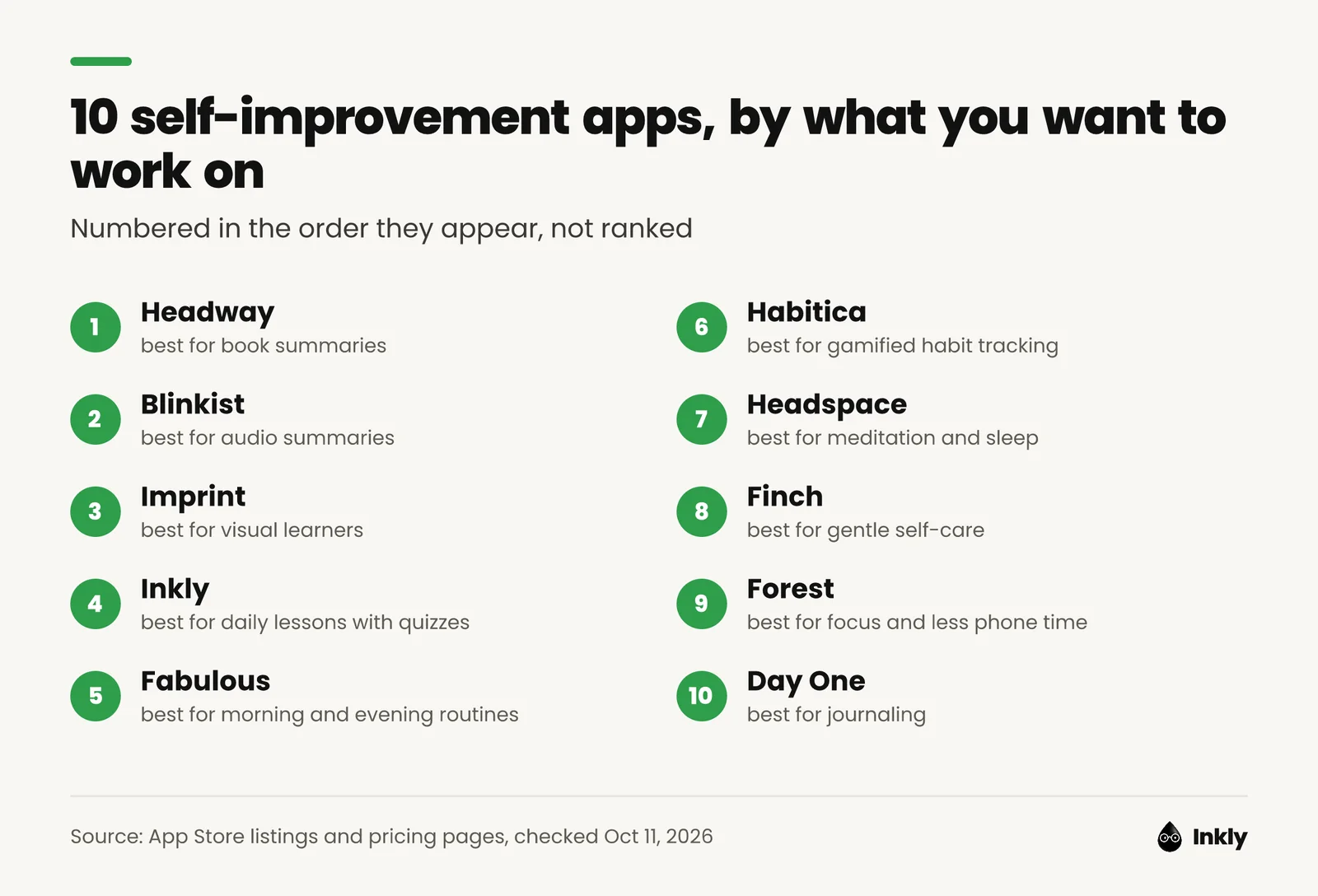
The best self improvement apps in 2026 are Headway, Blinkist, Imprint, Inkly, Fabulous, Habitica, Headspace, Finch, Forest and Day One, each matched to one goal. The table puts them side by side.
| App | Best for | Free tier | Price from | Platforms |
|---|---|---|---|---|
| Headway | Book summaries | 1 summary a day | $19.99 first 4 weeks | iOS, Android, web |
| Blinkist | Audio summaries | 1 daily pick | $79.99 first year | iOS, Android, web |
| Imprint | Visual lessons | None listed | $15.99/month | iOS, Android |
| Inkly | Daily lessons + quizzes | Plan preview only | $9.99/month | iPhone only |
| Fabulous | Routines | Trial only | $16.99 (in-app) | iOS, Android, Mac, Windows |
| Habitica | Gamified habits | Yes, full app | Free ($4.99/month optional) | iOS, Android, web |
| Headspace | Meditation and sleep | Trial only | $12.99/month | iOS, Android, web |
| Finch | Gentle self-care | Yes, core app | Free (Plus $9.99/month) | iOS, Android |
| Forest | Focus | Yes, with ads | Free (Plus $5.99/month) | iOS, Android, browser |
| Day One | Journaling | Yes, 1 device | Free (Silver $49.99/year) | iOS, Android, Mac, Windows, web |
Prices are in US dollars, checked on October 11, 2026, on each company's pricing page or US App Store listing. Intro prices renew higher, and the entries below give the details. "In-app" means the lowest Premium price on the App Store's in-app purchase list, which doesn't say what billing period it covers.
How we picked: we started with what people want to work on (ideas, habits, stress, focus, reflection), then chose one or two apps per goal that have a clear job and publish their prices. Every app fact comes from App Store and Google Play listings, official pricing pages, help centers and store ratings. We did not hands-on test all ten, so treat this as a researched shortlist, not a lab report. And number 1 isn't better than number 10; the numbers just help you find your place.
What are the best learning apps for adults?
For adults who want to learn ideas rather than tick boxes, the best learning apps here are Headway and Blinkist for book summaries, Imprint for visual lessons and Inkly for daily lessons with quizzes. All four fit into a 5 to 15 minute gap.
1. Headway: best for book summaries
Headway is a microlearning app that turns non-fiction bestsellers into 15-minute summaries you can read or listen to.
- Best for: getting the main ideas of a popular book before (or instead of) reading all of it.
- What you get: according to Headway's App Store listing, 1,700+ summaries, daily bite-size sessions, challenges on topics like confidence and money, and spaced-repetition flashcards.
- Price: the free plan stops at one summary a day. As of October 2026, Headway's price page lists a 4-week plan at $19.99 for the first period, then $39.98 every 4 weeks. On the App Store, the yearly plan is $89.99 after a one-week free trial.
- Platforms: iOS, Android and a desktop web version. 4.6 stars from 117,000+ US App Store ratings.
- Drawback: if you buy on the website, the renewal price is double what you paid the first time. The rest is in our full Headway review.
2. Blinkist: best for audio summaries
Blinkist is a book-summary app with 9,000+ summaries of non-fiction books and podcasts, each about 15 minutes, in text and audio.
- Best for: commutes, workouts and chores, or any time your ears are free and your eyes aren't.
- What you get: the full library, expert-led audio Guides, offline listening and a free second Premium account to share. Pro adds Blinkist AI, which summarizes videos, podcasts, articles and documents.
- Price: the free Basic plan gives you one summary a day, and Blinkist's editors pick it. As of October 2026, Blinkist's pricing page lists Premium at $99.99 a year ($79.99 the first year with an auto-applied coupon) and Pro at $174.99 a year ($139.99 the first year).
- Platforms: iOS, Android, web and CarPlay. 4.8 stars from 156,000+ US App Store ratings.
- Drawback: you don't get a say in the free daily book, and Pro costs $75 a year more than Premium. Our Blinkist review and Headway vs Blinkist comparison go deeper.
3. Imprint: best for visual learners
Imprint is a visual learning app that explains ideas from psychology, philosophy, history, finance and science with illustrations instead of walls of text.
- Best for: people who remember a diagram long after they've forgotten the paragraph.
- What you get: the App Store listing describes courses, quick reads and visual guides to bestsellers such as Sapiens and Atomic Habits. Chapters take two minutes or less, and there are daily quizzes.
- Price: as of October 2026, the US App Store lists a monthly subscription at $15.99 and yearly subscriptions at $74.99 and $99.99. We looked for a free plan on its site and listing and couldn't find one.
- Platforms: iOS and Android. 4.8 stars from 57,000+ US App Store ratings.
- Drawback: there's no web app and no listed free plan, so study the store screenshots before you pay. The whole app rests on its visual style; if that doesn't click for you, there's no plan B.
4. Inkly: best for daily lessons with quizzes
Inkly is an iPhone app that works like Duolingo for personal growth: it turns big ideas from non-fiction books, such as Thinking, Fast and Slow, into short daily lessons and quizzes. Inkly is our app, so weigh our take accordingly.
- Best for: remembering what you read, with a daily quiz to check it stuck.
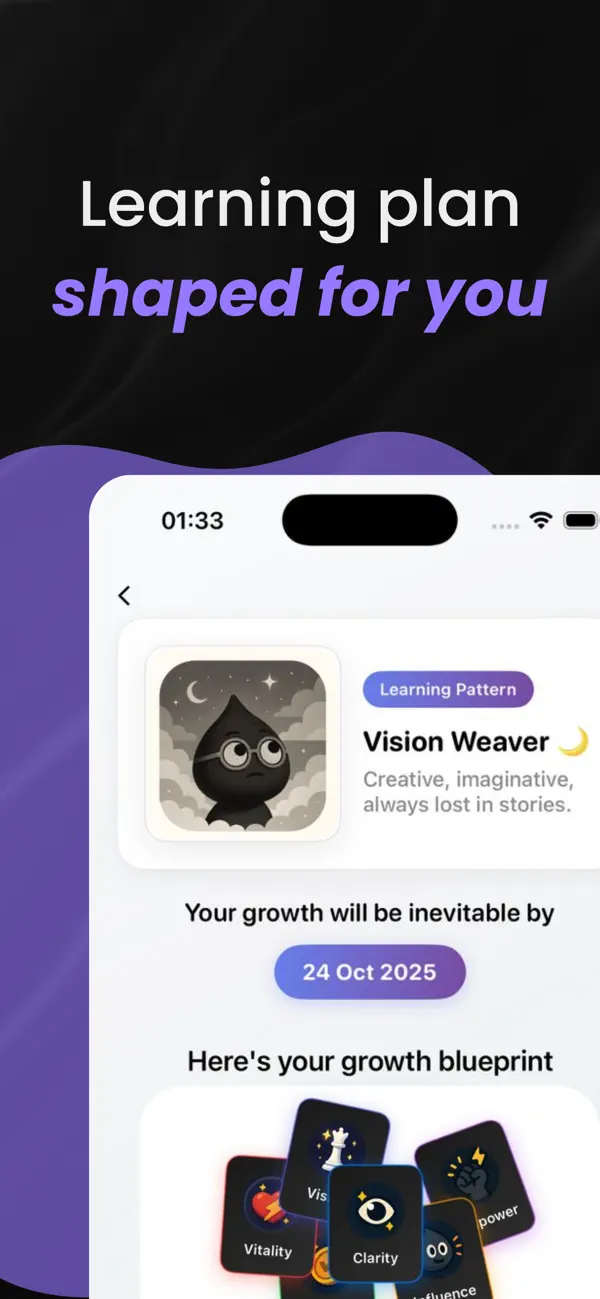
- What you get: a learning type (for example "Vision Weaver"), an adaptive plan built from your goals and habits, daily insights, quizzes, chat with Inkly to turn ideas into action, and streaks plus a growth map across six areas.
- Price: the learning-pattern analysis and plan preview are free. Lessons, quizzes, AI reflection and progress tracking need Inkly Unlimited; as of October 2026, the App Store listing shows plans from $9.99 a month or $19.99 a year.
- Platforms: iPhone only. 4.6 stars from 17 App Store ratings.
- Drawback: no Android or web app. And the free part is only a preview; the lessons themselves need Unlimited.
Which apps help you build habits and routines?
Fabulous and Habitica, depending on who you want in charge. Fabulous designs your morning and evening routines for you, while Habitica lets you set your own habits and turns them into a game.
5. Fabulous: best for morning and evening routines
Fabulous is a routine-building app that started as a habit tracker and now coaches you through daily routines, journaling, short workouts and breathing exercises.
- Best for: people who want structure handed to them instead of building a system from scratch.
- What you get: its App Store listing mentions guided routines, a daily planner, coaching series on topics such as anxiety and productivity, a gratitude journal and live group challenges.
- Price: Fabulous says Premium is billed monthly or annually and starts with a trial. As of October 2026, the US App Store lists Premium options from $16.99 to $59.99.
- Platforms: iOS, Android, plus Mac and Windows downloads on its site. 4.4 stars from 89,000+ US App Store ratings.
- Drawback: it has the lowest store ratings on this list (3.9 on Google Play), and several recent reviews there complain about charges after a free trial. If you start one, set a reminder for the day before it ends.
6. Habitica: best for gamified habit tracking
Habitica is a habit tracker that turns your habits and to-dos into a retro role-playing game: check off a task in real life and your avatar earns gold and experience.
- Best for: anyone who likes games and needs a reason to show up other than willpower.
- What you get: habits, dailies and to-dos, a leveling system, collectible gear and pets, and parties where friends team up to keep each other honest.
- Price: the App Store listing says the app "can be fully enjoyed for free." Optional subscriptions run from $4.99 a month to $47.99 a year.
- Platforms: iOS, Android and the web at habitica.com. 4.3 stars from about 3,500 US App Store ratings and 4.7 on Google Play.
- Drawback: if games aren't your thing, the RPG layer is just noise. Streaks is a calmer Apple-only option at a one-time $5.99, and if you'd rather use a pen, try our free monthly habit tracker.
Which apps help with stress, sleep and self-care?
For meditation and sleep, Headspace is the stronger pick. Finch is softer and cheaper, and it's built around small daily self-care check-ins.
7. Headspace: best for meditation and sleep
Headspace is a meditation and mental health app with guided meditations, sleep content and breathing exercises.
- Best for: beginners who want a guided 3-minute reset or a full wind-down before bed.
- What you get: 500+ guided meditations, sleep sounds and sleepcasts, programs for stress and anxiety, and an AI companion called Ebb. Therapy and coaching are priced separately.
- Price: as of October 2026, the US App Store listing shows $12.99 a month or $69.99 a year. Headspace's subscriptions page offers a 14-day free trial of the annual plan.
- Platforms: iOS, Android and desktop browsers. 4.8 stars from 973,000+ US App Store ratings.
- Drawback: there's no lasting free plan. Once the trial ends, you pay or you stop. Headspace also says some content may only be available on mobile, so don't count on the browser version for everything.
8. Finch: best for gentle self-care
Finch is a self-care app where you look after a small pet bird by looking after yourself: you set small goals, check in on your mood, and your bird goes off on adventures.
- Best for: days when self improvement feels like too much and you need small, kind wins.
- What you get: goal tracking, mood check-ins, guided breathing, journaling prompts, short quizzes on how you're doing, and insights from your mood data.
- Price: Finch says its core self-care features are free. As of October 2026, Finch Plus costs $9.99 a month or $69.99 a year and adds more reflection prompts, activities, timer options and seasonal rewards.
- Platforms: iOS and Android. 4.9 stars from 762,000+ US App Store ratings.
- Drawback: Finch is a self-care tool and won't teach you new ideas. Also, the cute pet will either charm you or drive you up the wall.
Which apps help you focus and reflect?
Forest helps you stay off your phone long enough to do the work. Day One gives you a private place to think about how it went.
9. Forest: best for focus and less phone time
Forest is a focus timer: you start a session, a virtual tree grows, and if you leave the app early, the tree withers.
- Best for: study sessions, deep work, and anyone whose hand reaches for the phone before their brain has a say.
- What you get: a focus timer, app blocking during sessions, Time Guard to block one app or site on a schedule, and group focus with friends. Plus users can spend coins to plant real trees; Forest says it has funded over 2 million.
- Price: Forest's site says the app is free with no time limit, with occasional ads outside focus sessions. As of October 2026, the US App Store lists Forest Plus at $5.99 a month or $35.99 a year, both labeled early bird.
- Platforms: iPhone, iPad, Android, and Chrome and Firefox extensions. 4.8 stars from 49,000+ US App Store ratings.
- Drawback: a virtual tree only motivates you if you care about the tree.
10. Day One: best for journaling
Day One is a private journaling app for text, photo, audio and video entries, with prompts and templates for when you're staring at a blank page.
- Best for: reflecting on what you're learning and spotting patterns over months.
- What you get: unlimited entries and journals, daily prompts, templates, streaks, reminders and end-to-end encryption.
- Price: as of October 2026, Day One's pricing page lists a free Basic plan (unlimited entries, 1 photo per entry, 1 device), Silver at $49.99 a year and Gold, which adds AI features, at $74.99 a year.
- Platforms: iPhone, iPad, Apple Watch, Mac, Android, Windows and web. 4.8 stars from 118,000+ US App Store ratings.
- Drawback: the free plan works on one device only. Day One also won't tell you what to work on: it records your thinking, and the coaching is up to you.
How to pick a self improvement app (and actually use it)
Pick one app for the one thing you most want to change. Try it free for a week and tie it to something you already do every day. Step by step:
- Name one goal for the next 30 days. "Finish two books" or "in bed by 11:30" beats "become a better person." Then choose the app built for that goal.
- Start free. Six of these ten have a free tier that doesn't expire. Use it (or the trial) for a week before you pay anything.
- Check what it renews at, because that's the price you'll keep paying. Headway's 4-week web plan goes from $19.99 to $39.98 after the first period, and Blinkist's $79.99 first year renews at $99.99.
- Hook it onto something you already do. In a study by Lally and colleagues (European Journal of Social Psychology, 2010), 96 volunteers repeated a new behavior daily in the same context, such as "after breakfast." Reaching their automaticity plateau took anywhere from 18 to 254 days, and missing a single day didn't materially hurt. Only 82 gave enough data to analyze, and the measure was self-reported, so treat the numbers as rough. Our guide on how long it takes to form a habit has the rest.
- Give it your phone's best spot: the one your most-opened social app used to hold.
- Audit after 30 days. If you opened it on fewer than half the days, cancel and try a different format. An app that doesn't fit you in week four rarely starts fitting in month three.
What are good apps to replace social media?
The best apps to replace social media come in pairs: a blocker that makes the feed harder to open, and a short learning app that fills the same five minutes. An endless feed will outlast your willpower most days, so change the setup instead:
- Block the feed. Opal's free plan gives you one blocking rule (a schedule, a time limit or an open limit), and Opal Pro costs $99.99 a year or $19.99 a month on iPhone, Android and Mac. Forest's free tier blocks apps during focus sessions too.
- Swap the scroll for 5 minutes of learning. Put a short lesson app (Headway, Imprint or Inkly) in the home-screen spot the social app used to hold, so your thumb lands on something with an end. Deepstash pitches itself the same way; our Deepstash review covers whether it delivers.
- Keep the streak, lose the feed. A streak still gives you the small "did my thing today" feeling, and a lesson stops after five minutes. A feed, by design, doesn't.
FAQ
What is the best app for self improvement?
There isn't a single best app for self improvement, because these apps do different jobs. Headway and Blinkist are for book summaries, Headspace for meditation, Habitica for free habit tracking and Day One for journaling. Pick the one that matches the thing you most want to change, and start on its free tier or trial.
Is there a Duolingo for self improvement?
Yes, a few apps borrow Duolingo's formula of short daily lessons, streaks and quizzes. Inkly describes itself as Duolingo for personal growth and quizzes you after each daily insight. Imprint adds daily quizzes to its visual lessons, and Headway has spaced-repetition flashcards. Inkly is iPhone only, while Imprint and Headway also run on Android.
Are self improvement apps worth paying for?
A self improvement app is worth paying for if you open it most days and it changes something you actually do. A $69.99 yearly plan like Headspace's works out to about $5.83 a month. Give the free tier or trial a week first, and check the renewal price, since intro offers from Headway and Blinkist renew higher.
What app makes you smarter?
No app reliably raises general intelligence. In 2016, Lumosity's maker agreed to pay $2 million to settle FTC charges that it advertised brain-training benefits it couldn't back up, and a 2016 review by Simons and colleagues found little evidence that brain training improves everyday thinking. Our take: learning real material and quizzing yourself on it, with apps like Imprint, Inkly or Headway's flashcards, is a better use of ten minutes than brain games.
What are good free self improvement apps?
Habitica is free in full, and Finch, Forest and Day One all have free tiers you can use indefinitely. Headway and Blinkist each give you one free summary a day. Opal's free plan covers one app-blocking rule if your main goal is less scrolling.
Which personal growth apps work on Android?
Nine of the ten apps in this list work on Android: Headway, Blinkist, Imprint, Fabulous, Habitica, Headspace, Finch, Forest and Day One. Inkly is iPhone only. Headway, Blinkist, Habitica, Headspace and Day One also work in a web browser, which matters if you want one self development app across your phone and laptop.