This Blinkist review is for you if you're about to start a trial or you're staring at a renewal email. We did not test Blinkist hands-on. Everything below comes from Blinkist's pricing page and help center, the App Store and Google Play listings, and public reviews, all checked on October 11, 2026.
The short version: the summaries are the easy part. Billing is where people get burned, so read the pricing and canceling sections before you tap "Start".
Blinkist review: the verdict by use case
Blinkist is a good buy for one kind of person and an expensive habit for everyone else.
- You commute, walk the dog or do chores with earbuds in: pay for Premium. Audio is Blinkist's strongest card, and it works offline, in CarPlay and in Android Auto.
- You want to test-drive books before you buy or borrow them: Premium, yearly. Fifteen minutes tells you whether a 300-page book deserves your weekend.
- You only want a taste: stay on the free Basic plan. One title a day costs nothing and never expires.
- You want AI summaries of your own PDFs, articles and videos: Pro, but only if you'd use it every week. At full price it's $75 a year more than Premium.
- You want real depth on one subject: skip it. Read the full book, or try Shortform, which adds analysis.
- You forget what you read within a week: Blinkist alone won't fix that. Jump to the quiz-based alternatives at the end.
What is Blinkist and how does it work?
Blinkist is a book-summary app that turns nonfiction books into "Blinks" you can read or listen to in about 15 minutes. It's made by Blinks Labs GmbH in Berlin and has been on the App Store since 2013. It runs on iPhone, Android and the web.
What you get, per Blinkist's own pages (October 2026):
- Blinks: the main product, in text and narrated audio. Blinkist's pricing page says it has 9,000+ book and podcast summaries, and the help center lists 27 categories. That count spans four languages, though. A 2025 help article put the English library at 5,000+ titles. Audio plays at up to 2x speed.
- Shortcasts: podcast episodes, boiled down. Blinkist's Free vs Premium explainer lists them as Premium only.
- Guides: expert-led courses on one topic. According to the help center, they mix original audio, Blinks and Shortcasts with exercises, infographics or quizzes.
- Shorts: five one-minute bites a day (quotes, micro-quizzes, short videos) that refresh every 24 hours.
- Spaces: shared reading lists. Start a Space for a topic or a book club, add titles and invite people. Spaces only work in the mobile app.
- Collections: curated lists by topic and goal, plus a personalized daily pick for paying members.
- Weekly Goals: pick how many days a week you want to finish a title, then keep the weekly streak going. Paid plans only.
- Blinkist AI (Pro only): paste a link or upload a file (web pages, podcasts, videos, PDFs) and get a Blink-style summary called an Extract. You can make as many as you like, but it works in the mobile app only.
- Extras: offline downloads and Send-to-Kindle.
As for who writes the Blinks, Blinkist says its writers, editors and field experts do, and that it is "experimenting with different AI tools" (help center). A couple of recent App Store reviews complain about padded, AI-sounding summaries.
How much does Blinkist cost?
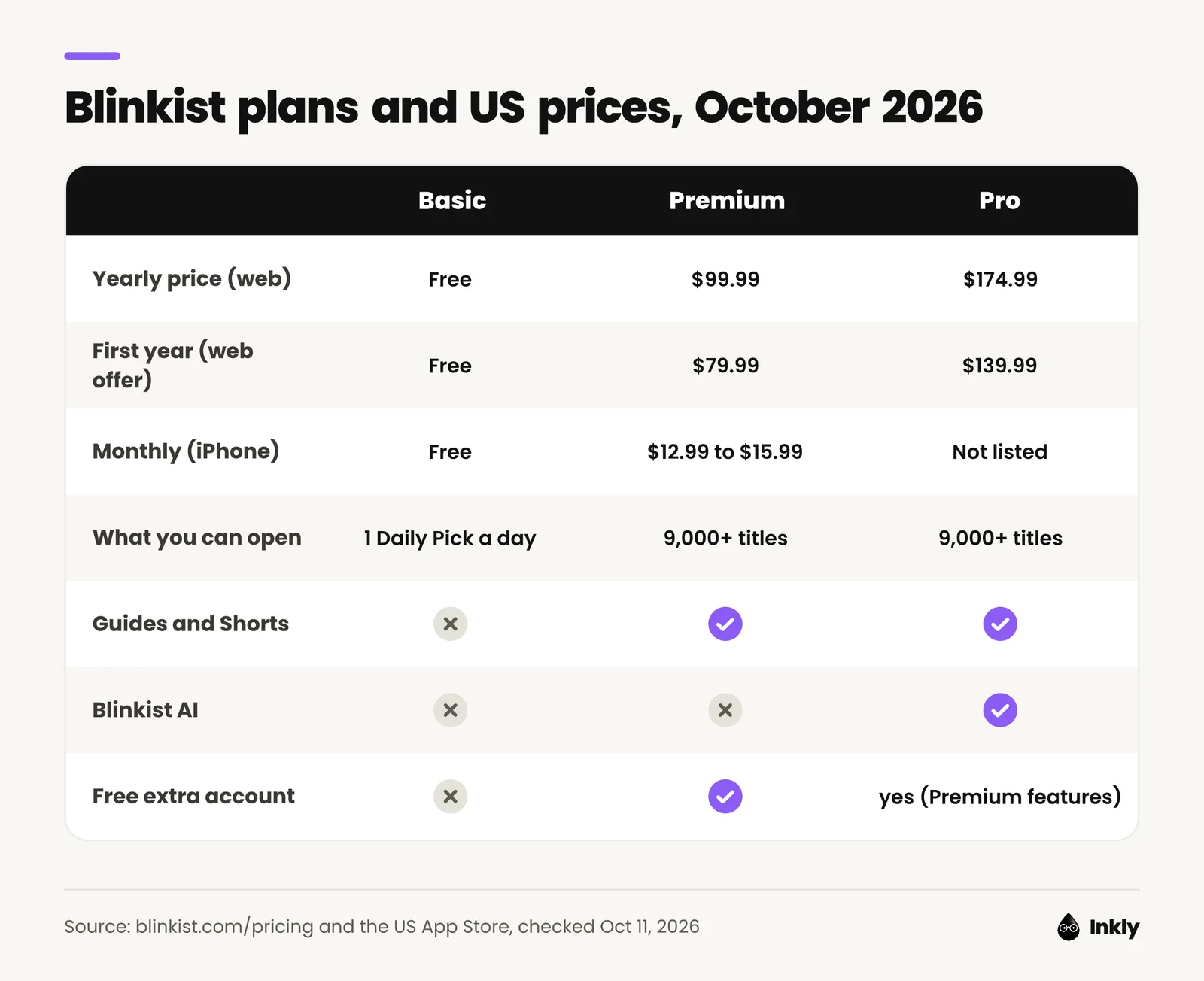
As of October 2026, Blinkist Premium costs $99.99 a year on the US pricing page. When we checked, the page applied a first-year price of $79.99 on its own. Pro adds Blinkist AI and costs $174.99 a year, or $139.99 for the first year. The US website only sells yearly plans. Monthly Premium does show up in the iPhone App Store.
| Plan | Where you buy | US price (checked Oct 11, 2026) | What you get |
|---|---|---|---|
| Basic | App or web | Free | One editor-picked title a day |
| Premium, yearly | blinkist.com | $79.99 first year, then $99.99/year | Full library, Guides, Shorts, offline, Kindle, 1 free extra account |
| Premium, yearly | iPhone App Store | $79.99 to $119.99, depending on the offer | Same as above |
| Premium, monthly | iPhone App Store | $12.99 to $15.99 a month | Same as above |
| Pro, yearly | blinkist.com | $139.99 first year, then $174.99/year | Premium plus Blinkist AI |
| Pro | iPhone App Store | $139.99 | Premium plus Blinkist AI |
| Platinum | App or web | No public US price found | Pro plus live sessions and infographics |
| Team | blinkist.com/business | Per seat, yearly ($890 for 10 seats, help center estimate) | For 5 to 50 people |
What the pricing page doesn't spell out:
- Prices vary by platform and region. The App Store listing shows four different yearly Premium prices and three monthly ones, so what you pay depends on the offer in front of you. Google Play only shows a range ($0.99 to $439.99 per item), which isn't much help. Go by the checkout screen.
- The discount only covers year one. After that, Premium renews at $99.99 and Pro at $174.99. Blinkist's help center says your account settings may already show that higher renewal price while you're still on the discount.
- Monthly is the expensive way in. Yearly Premium at $99.99 works out to $8.33 a month. Pay monthly at $12.99 to $15.99 and you'll spend $155.88 to $191.88 over a year.
Does Blinkist have a free trial?
Sometimes. Blinkist's help center says it offers a 7-day free trial on yearly plans "in some cases", and that checkout shows the details when one applies (trial article). The Google Play listing advertises a free 7-day trial. The US web pricing page we checked on October 11 had no trial at all, just the first-year discounts.
If you do start one:
- You can only use a trial once.
- Cancel at least 24 hours before it ends, or the full yearly charge goes through.
- On Android, Google may put a temporary hold on your card a day before the trial ends. Blinkist says that hold can take up to 14 business days to drop off after you cancel.
How do Blinkist renewals and refunds work?
Every Blinkist plan auto-renews at the end of its term. Canceling stops the next charge, and you keep access until the paid period ends.
Refunds depend on where you paid. If it's a first-time purchase on the web or Google Play, Blinkist offers a 14-day money-back guarantee: email support within 14 days. Renewals aren't covered. On iPhone, Apple makes the call, and Blinkist says it can't overrule Apple.
Is Blinkist free?
Yes, with a catch. Blinkist Basic is free with no time limit and gives you one pre-selected title a day, called the Daily Pick or Blink of the Day. You'll find it at blinkist.com/daily or on the For You screen in the app.
The catch: you can't choose the title or browse the rest of the library. Blinkist's help center says you can read or listen to the free pick, while one of its own explainer pages says it's text only. Since Blinkist can't agree with itself, don't count on audio.
Two legit ways to get more without paying:
- Borrow a seat. Every personal Premium plan includes one extra account at no extra cost, with separate libraries. If your partner or a friend already pays, ask for their spare. (A Pro plan shares Premium features only, not the AI.)
- Join a Space. Basic members invited to a Space can read or listen to the titles a paying member adds there, even ones that are normally locked.
Heads-up: when a paid plan ends, Blinkist keeps your saved library on file but won't let you open it again until you resubscribe.
How is Blinkist rated on the App Store and Google Play?
Blinkist has 4.8 stars on the US App Store from about 157,000 ratings and 4.6 stars on Google Play from about 177,000 ratings, as of October 11, 2026.
| Platform | Rating | Number of ratings | Checked |
|---|---|---|---|
| App Store (US) | 4.8 / 5 | 156,709 | Oct 11, 2026 |
| Google Play (US) | 4.6 / 5 | 177,388 (10M+ downloads) | Oct 11, 2026 |
| Trustpilot | 4.3 TrustScore | 1,544 reviews | Oct 11, 2026 |
Those averages hide a love-it-or-hate-it split. On Trustpilot, 59% of reviews are five stars and 29% are one star, with little in between.
We also read the 50 most recent US App Store reviews (June 6 to October 10, 2026): 24 gave five stars and 16 gave one star. Of those 16 one-star reviews, 10 were about trial charges, renewals, refunds or trouble canceling. The five-star reviews mostly praise the narration and the 15-minute format. So the anger is mostly about money, not the writing.
Blinkist pros and cons
These come from Blinkist's listings and help center, plus patterns in public reviews.
Pros
- Big library: 9,000+ titles across four languages, plus podcast summaries and Guides.
- Strong audio: narrated Blinks, offline downloads, CarPlay, Android Auto and up to 2x speed. Reviewers often single out the narrators.
- A real free tier: one title a day with no card and no end date.
- Generous sharing: Premium comes with a second account, so two people can split it for about $50 each per year.
- A refund window: 14 days on first-time web and Google Play purchases.
Cons
- Billing is the top complaint: reviewers describe trials turning into yearly charges, surprise renewals at the higher standard price, and cancel flows that are hard to find.
- Depth: 15 minutes gets you a book's conclusions, not its evidence. Some reviewers say complex books come out flattened.
- AI costs extra: Blinkist AI needs Pro ($75 more a year at full price) and only works in the mobile app.
- Light on recall: the help center describes quizzes in Shorts and Guides, but not at the end of regular Blinks.
- Some app bugs: two recent App Store reviews mention sluggish scrolling and playback losing its place.
Is Blinkist worth it?
Blinkist is worth it if you'll finish at least two Blinks a week. At the full $99.99 yearly price, that's about 96 cents a title. Any fewer and the free Daily Pick probably covers you.
Pay for it if:
- You have dead time with your ears free: commuting, driving, gym, dishes.
- You use summaries to decide which books deserve a full read.
- You can split Premium with someone through the free extra account.
Skip it if:
- You'd rather read the full book. Use your library card instead. Many US libraries lend ebooks and audiobooks free through Libby. Our reading time calculator shows how many full books 20 minutes a day gets you in a year.
- You want to remember what you learn. A 15-minute summary is easy to forget. Our guide on how to remember what you read covers what works better.
- You hate babysitting subscriptions. If you subscribe anyway, put a reminder in your calendar two days before the renewal date.
Our take: spend a week on the free Daily Pick first. If you open the app every day, the yearly plan is a fair deal. If you forget it exists by Thursday, you've saved $80.
How do I cancel Blinkist?
You cancel Blinkist where you paid: in Apple's subscription settings for App Store purchases, in Google Play for Android purchases, or in Blinkist's own settings if you paid on the website. Deleting the app doesn't cancel anything.
Not sure who billed you? Your card statement or receipt will say. If Blinkist doesn't appear in your Apple or Google subscriptions, you most likely paid Blinkist directly, so use the web steps.
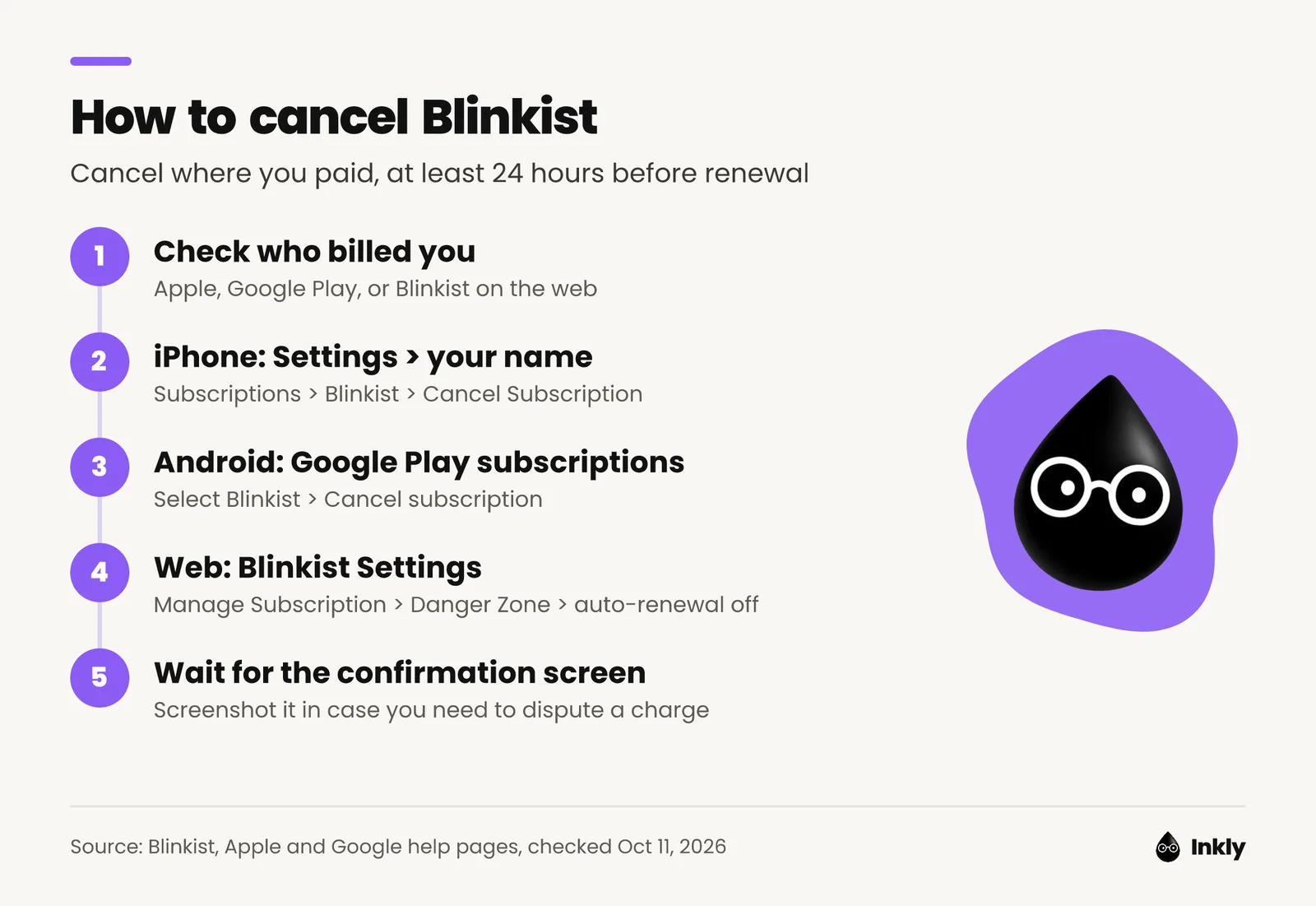
On iPhone (paid through the App Store), per Apple's instructions:
- Open Settings and tap your name.
- Tap Subscriptions.
- Tap Blinkist.
- Tap Cancel Subscription. If there's no Cancel button, or you see an expiration message in red, it's already canceled.
On Android (paid through Google Play), per Google's instructions:
- On your Android device, go to your subscriptions in Google Play.
- Select Blinkist.
- Tap Cancel subscription.
- Follow the instructions on screen.
On the web (paid on blinkist.com), per Blinkist's help center:
- Open Settings in the Blinkist app or on blinkist.com, logged in with the email on your subscription.
- In the app, tap Manage Subscription.
- Scroll down to the Danger Zone.
- Select Turn off auto-renewal.
- Confirm each prompt until you see the screen saying your subscription is canceled.
Can't log in? Blinkist's cancellation page has a form for web subscriptions. You'll need your email address and your subscription start date.
Two more things:
- If you joined through someone's Premium Sharing or through your employer, there's nothing to cancel.
- One recent App Store reviewer says the cancel flow dangled a discount. You can turn it down and keep going.
What are the best Blinkist alternatives?
The best Blinkist alternative depends on what bugs you about Blinkist.
- Headway: the closest match, with text and audio summaries of nonfiction bestsellers (1,700+, per its listing) plus self-growth challenges and spaced-repetition flashcards. See our Headway vs Blinkist comparison and Headway app review.
- Shortform: for depth. Chapter-by-chapter summaries, plus analysis that compares each book's ideas with other books (App Store).
- Imprint: for visual learners. Illustrated lessons cover psychology, history, finance and more, with daily quizzes (App Store).
- Deepstash: for five-minute breaks. Curated ideas from popular books, built for a few minutes a day. Read our Deepstash review.
- Inkly: if you want quizzes and a learning plan rather than summaries. Inkly is our app, so weigh our take accordingly. It's iPhone only. It builds an adaptive plan from your goals, serves short daily insights from nonfiction books and then quizzes you on them. It's free to download, but the daily insights and quizzes need an Inkly Unlimited subscription (App Store).
Our roundup of the best self-improvement apps has a longer list.
FAQ
Is Blinkist free?
Blinkist has a free Basic plan that gives you one title a day, picked by Blinkist's editors. You can't choose it or browse the rest of the library. The full 9,000+ title library needs Premium or Pro.
How much does Blinkist cost per month?
As of October 2026, the iPhone App Store lists monthly Blinkist Premium at $12.99 to $15.99. The US website doesn't sell a monthly plan. Yearly Premium costs $99.99 ($8.33 a month), or $79.99 for the first year on blinkist.com.
Is Blinkist worth it?
Blinkist is worth it if you'll finish two or more Blinks a week, mostly as audio. At $99.99 a year, that's under $1 a title. If you prefer full books or would only open the app twice a month, stick with the free Daily Pick.
Does Blinkist have a free trial?
Sometimes. Blinkist says it offers a 7-day free trial on yearly plans in some cases, and its Google Play listing advertises one. On October 11, 2026, though, the US web pricing page showed first-year discounts instead. If you start a trial, cancel at least 24 hours before it ends or the yearly charge goes through.
How do I cancel Blinkist?
Cancel where you paid. On iPhone: Settings, your name, Subscriptions, Blinkist, Cancel Subscription. On Android: Google Play subscriptions, Blinkist, Cancel subscription. On the web: Blinkist Settings, Manage Subscription, Danger Zone, Turn off auto-renewal.
Is Blinkist legit?
Yes. Blinkist is made by Blinks Labs GmbH in Berlin and has been on the App Store since 2013, where it holds 4.8 stars from about 157,000 ratings. Most complaints are about auto-renewal and trial charges, so write down your renewal date the day you subscribe.
Is Blinkist better than Headway?
Blinkist has the bigger library (9,000+ titles vs Headway's 1,700+, per their App Store listings) plus podcast summaries and Guides. Headway leans on self-growth challenges and flashcards instead. Pick Blinkist for breadth and audio, or Headway if challenges keep you coming back.